






The Finseo ChatGPT plugin brings AI search visibility data into ChatGPT: fifteen read only tools, connected with your Finseo login, installed from the plugin directory in one click.
It is for marketing teams and agencies whose reporting already happens in ChatGPT, and who currently paste screenshots of a dashboard into it. This article covers what the plugin does, how OpenAI's directory works after the July 2026 rename, what our data shows about the engine you are reading this in, and where the plugin stops.
What went live
Finseo is listed in the ChatGPT plugin directory as Finseo, Track AI Visibility, AEO & GEO, live since September 2026. Installing it is one click from the directory, then a Finseo sign in. The MCP server behind it is https://api.finseo.ai/v1/mcp, the same endpoint that serves Finseo's MCP server to Claude, Cursor and Claude Code.
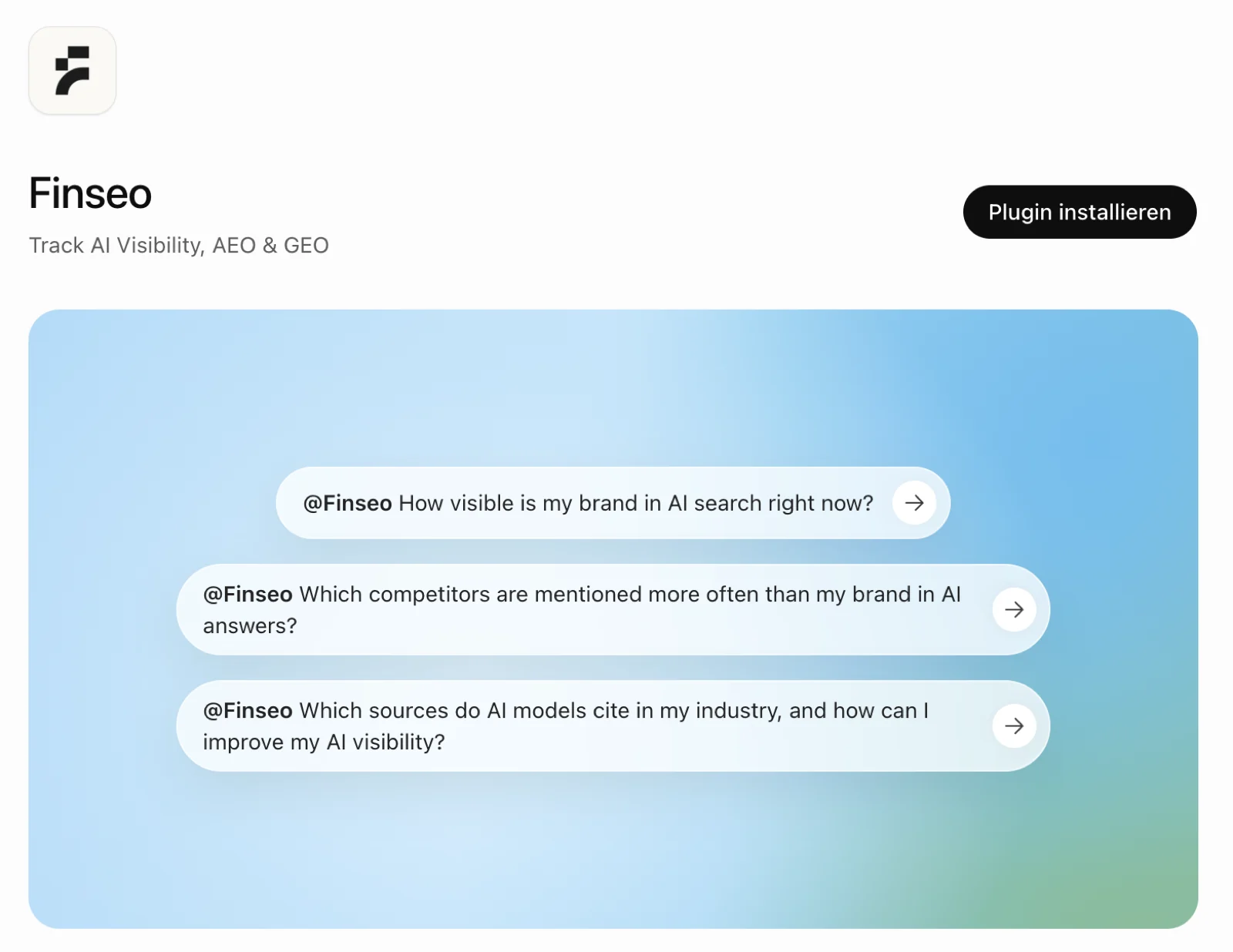
Before the listing, connecting Finseo to ChatGPT meant turning on developer mode, creating an app by hand and pasting a server URL. That route still works and is documented, but nobody in a marketing team should have to take it.
Apps, plugins and what OpenAI renamed in July
If the vocabulary has moved under you, it has. OpenAI's help documentation states it plainly:
"As of July 9, 2026, we've migrated the app directory to the Plugin directory. Plugins are the primary way to discover workflow capabilities across ChatGPT and Codex. A plugin can include skills, apps, and app templates, apps remain the integrations that connect ChatGPT or Codex to external data and actions."
So the app is still the thing that connects ChatGPT to an external system. The plugin is the package that ships it, and the directory that used to list apps now lists plugins. The timeline, which is worth having in one place:
| Date | What happened |
|---|---|
| Date25 November 2024 | What happenedAnthropic publishes the Model Context Protocol, the standard both companies now build on |
| Date6 October 2025 | What happenedOpenAI launches apps in ChatGPT and the Apps SDK, built on MCP, with 7 pilot partners |
| Date17 December 2025 | What happenedThird party app submission opens, with an in ChatGPT directory |
| Date9 July 2026 | What happenedThe app directory becomes the Plugin directory, shared across ChatGPT and Codex |
| DateSeptember 2026 | What happenedFinseo is live in the directory |
The practical consequence for a marketing team is that "ChatGPT plugins" is a live term again after two years of being a museum piece, and that the thing behind it is MCP rather than the 2023 plugin format.
The fifteen tools, and what each one answers
Every tool is read only. ChatGPT can analyse your data and can never change it.
| Tool | The question it answers |
|---|---|
Toollist_projects | The question it answersWhich projects and models am I tracking? |
Toolget_visibility_metrics | The question it answersWhat are my visibility, mention and citation rates, versus the period before? |
Toolget_visibility_timeseries | The question it answersHow did those rates move, day by day? |
Toollist_prompts | The question it answersWhich tracked prompts perform, and which do not? |
Toolget_prompt_details | The question it answersFor one prompt, what happened per model and per answer? |
Toolget_answer_content | The question it answersWhat did the model literally write on this day, and what did it cite? |
Toolget_competitor_ranking | The question it answersWho is ahead of me, on which KPI? |
Toolget_competitor_gap_analysis | The question it answersWhich answers name them and not me, and on which prompts? |
Toolget_competitor_h2h | The question it answersWho gets named first, and what do models claim about each of us? |
Toolget_sentiment_overview | The question it answersWhat is my Share of Voice, and what is said negatively about me? |
Toolget_top_sources | The question it answersWhich sources do models cite in my category? |
Toolget_tags | The question it answersHow is my prompt set segmented? |
Toolget_query_fanouts | The question it answersWhich sub-queries do engines actually run? |
Toollist_tasks | The question it answersWhat is on my optimisation backlog, by priority? |
Toolget_task_details | The question it answersFor the top task, what exactly do I do, and on what evidence? |
Every analytics tool takes a model filter and a tags filter, and either a relative window or an explicit startDate and endDate. Tags are how a prompt set built for AI search gets segmented, so the filter is only as good as the tagging behind it. That is what makes a monthly report possible in one sentence: "compare 1 to 31 August against July, ChatGPT only, for the tagged commercial prompts".
What our data says about the engine you are standing in
The reason to measure ChatGPT separately rather than as part of an average is that it does not behave like the average.
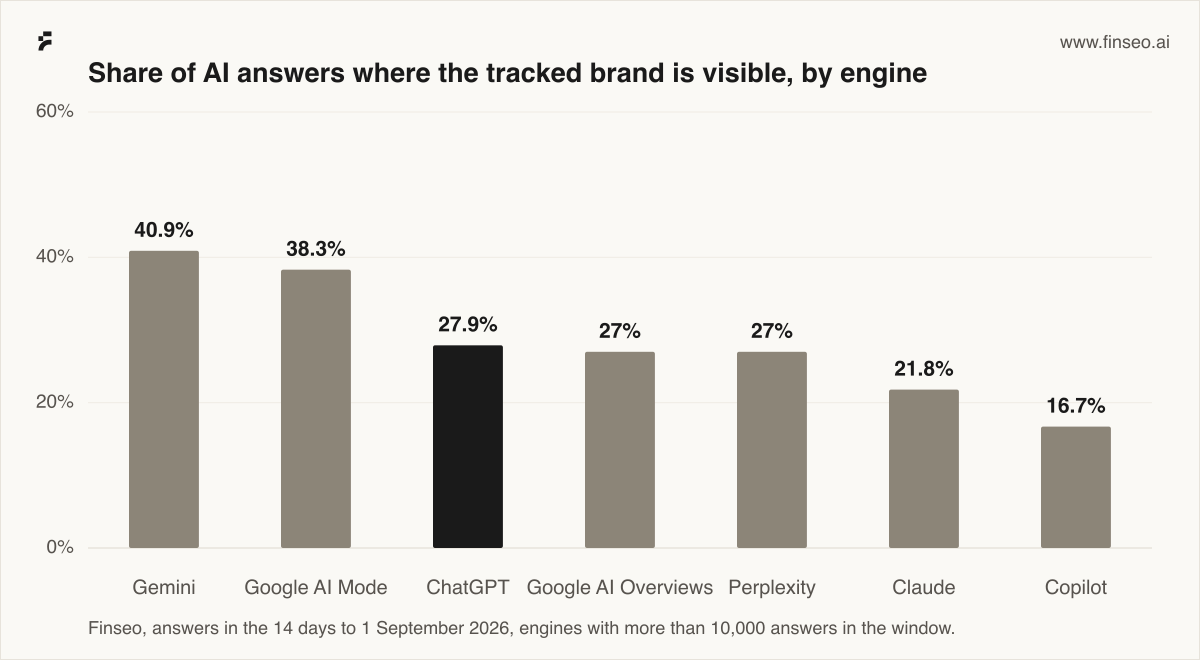
Visible means named in the answer text or cited as a source, which is the definition the get_visibility_metrics tool returns. The spread runs from 16.7% to 40.9%, and ChatGPT sits in the middle of it on by far the largest sample: 242,294 answers in fourteen days, against 10,973 for Copilot. A brand reporting one blended visibility number across engines is reporting a weighted average of things that do not move together, which is the single most common mistake we see in AI visibility tracking.
Volume is the other reason. In the ninety days to 31 August 2026 we analysed 4,201,041 answers across eleven models, out of a corpus of 8,938,509 answers and 8,846,011 cited sources. A monthly client report that pulls from that in a chat window is a different job from one assembled by hand.
Method note
The figures above are ours, aggregated across accounts, with no customer, project, private domain or account identifiable in any of them. Visibility rates cover answers in the fourteen days to 1 September 2026, restricted to engines with more than 10,000 answers in that window, which excludes Grok and the ChatGPT browser interface as too thin to publish. Corpus totals are planner estimates of live row counts on the same date, not exact counts.
The skew is the thing to hold onto. Our corpus is built from prompts our customers chose to track, weighted toward commercial and comparison intents in the categories they sell into. That makes it large but not random. Read 27.9% as a figure for brands of this kind on prompts of this kind, not as a statement about how often any brand appears in ChatGPT.
Engine sample sizes are also unequal by an order of magnitude, so treat the ordering as reliable and the gap between two adjacent engines as less so.
What agencies get out of it that a dashboard does not
Three things, in the order they tend to matter.
One endpoint, every client. The plugin reads whichever projects the signed in account can already see, so an agency account with forty projects gets forty projects. There is no per client setup.
Reporting in the language of the report. get_competitor_gap_analysis returns the prompts where a competitor appears and the client does not, and get_answer_content returns the answer text that proves it. That is the evidence slide, and it arrives as text you can edit rather than a screenshot you cannot.
The backlog, not just the score. list_tasks and get_task_details return the prioritised tasks for AI content optimization with the evidence that triggered them and a step by step plan. A client meeting that ends in a task list rather than a chart is a different meeting. More on that in what agencies run on this.
The platform scale behind the distribution is real, if usually misquoted. OpenAI reported more than 900 million weekly active ChatGPT users on 27 February 2026, and more than 9 million paying business users. What OpenAI has not published is any aggregate figure for plugin or app installs, so treat "reach" claims about the directory, including any you might infer from this article, as unmeasured.
How to install it
- In ChatGPT, open the plugin directory and search for Finseo.
- Click Install plugin.
- Sign in with your Finseo account and allow access.
- Enable Finseo in a conversation and ask a question.
Questions worth starting with:
- "How visible is my brand in AI search this month, and how did it change versus the previous period?"
- "How much of my visibility is being named versus being cited? Which prompts are cited only?"
- "Rank my competitors and run a gap analysis against the strongest one."
- "Which sources do models cite most for my tracked prompts, ChatGPT only?"
- "What are my most important open tasks, and what exactly should I do for the top one?"
A Finseo account on a paid plan with at least one tracking project is the prerequisite. If your workspace administrator restricts plugins, the developer mode route with a Bearer key from your API settings still works.
Where the plugin stops
It does not write. No tool edits a project, adds a prompt or changes a setting.
It does not do charts well. Anything comparative and visual belongs in the report builder, which is built for it.
It does not make the number more true. ChatGPT summarises what the tools return, and a summary of a figure is not the figure. For anything going to a client, take the number from the tool output.
And it does not measure itself for you. The plugin reads your visibility in ChatGPT because we track ChatGPT visibility as an engine. Installing a plugin does not change how often ChatGPT names you, and anyone telling you otherwise is selling something.
FAQ
Are there ChatGPT plugins again? Yes, though they are not the 2023 ones. OpenAI's help documentation states that as of 9 July 2026 the app directory became the Plugin directory, and that a plugin can include skills, apps and app templates. Today's plugins are built on the Apps SDK, which extends the Model Context Protocol.
What is the difference between a ChatGPT app, a plugin and a connector? An app is the integration that connects ChatGPT to external data and actions. A plugin is the package that ships one or more apps and skills, and it is what the directory lists. Connector is the term Anthropic uses in Claude for the same idea. Finseo's server is the same MCP endpoint in all three cases.
Can I use MCP apps in ChatGPT? Yes. The Apps SDK is built on MCP, which is why one Finseo endpoint serves ChatGPT, Claude, Cursor and Claude Code without a separate build for each.
Are ChatGPT plugins safe? The general answer is that a plugin can do whatever its tools allow, so the scopes on the consent screen are the thing to read. For Finseo specifically: every tool is read only, the connection is OAuth scoped to your account over HTTPS, and API keys are SHA-256 hashed before storage.
Do I need developer mode? Not any more. Developer mode was the route before the directory listing and still works for custom setups or restricted workspaces. Installing from the directory needs no developer mode.
Which engines does the data cover?
ChatGPT, Google AI Overviews, Google AI Mode, Perplexity, Gemini, Claude, Copilot, Grok and others, filterable per tool with the same model filter as the dashboard.
Does it cost extra? No. The plugin is included with a Finseo plan and reads the projects that plan already tracks.
Next step
The same endpoint powers a REST API for anything that belongs in a pipeline rather than a conversation.
Sources
Ours
- Finseo visibility by engine, answers in the fourteen days to 1 September 2026, engines with more than 10,000 answers in the window
- Finseo corpus window, 4,201,041 answers across eleven models in the ninety days to 31 August 2026
- Finseo tracked corpus, live row counts on 1 September 2026: 8,938,509 analysed answers and 8,846,011 cited sources
External
- OpenAI Help Center, Apps in ChatGPT, on the 9 July 2026 migration of the app directory to the Plugin directory: https://help.openai.com/en/articles/11487775-apps-in-chatgpt
- OpenAI (6 October 2025), Introducing apps in ChatGPT and the new Apps SDK, the Apps SDK on MCP and the seven pilot partners: https://openai.com/index/introducing-apps-in-chatgpt
- OpenAI (17 December 2025), Developers can now submit apps to ChatGPT: https://openai.com/index/developers-can-now-submit-apps-to-chatgpt
- OpenAI Developers, Submit plugins, on identity verification, the MCP endpoint requirement and the review queue: https://developers.openai.com/plugins/deploy/submission
- OpenAI (27 February 2026), Scaling AI for everyone, more than 900 million weekly active users and more than 9 million paying business users: https://openai.com/index/scaling-ai-for-everyone
- Anthropic (25 November 2024), Introducing the Model Context Protocol: https://www.anthropic.com/news/model-context-protocol
Google Search
Save Finseo as a preferred source to see our articles more often in Top Stories, AI Overviews and AI Mode.